Smart switches, cameras, and hubs don’t just plug in and work in every home. In many Chatham-Kent houses, the wiring itself missing neutral wires, no structured cabling, hubs sharing a crowded circuit is what causes flickering lights, buzzing dimmers, and dead Wi-Fi zones, not the device you just bought.
Why Homeowners Are Running Into Wiring Problems With Smart Devices
Most smart home shopping happens the same way: pick a switch, thermostat, or camera, install the app, and expect it to work like any other fixture. For a lot of newer builds, that’s exactly how it goes. But many homes in Chatham-Kent, Wallaceburg, and across Sarnia-Lambton were wired decades before “smart” anything existed, and that older wiring wasn’t built with these devices in mind.
The result shows up mid-installation, not before. A new dimmer buzzes or won’t turn off fully. A smart hub placed in a basement utility room loses connection to devices upstairs. A security camera keeps dropping offline because the router it depends on is fighting for bandwidth on the same circuit as three other appliances.
None of this is a device defect, and it’s usually not a panel capacity problem either; it’s a mismatch between what modern smart devices expect and what the home’s low-voltage and switch-leg wiring was ever designed to provide. That mismatch is the actual subject of this guide, and it’s the gap JCP Electric Ltd. is called in to close for homeowners across Chatham, Wallaceburg, Tilbury, Dresden, Ridgetown, Blenheim, and Sarnia-Lambton.
Smart Home Wiring vs. Standard Wiring
| Feature | Standard Home Wiring | Smart Home Wiring |
| Voltage type | Line voltage (120V) for lighting, outlets, appliances | Line voltage for switches/outlets plus low-voltage circuits (typically under 30V) for network, sensors, and controllers |
| Switch wiring | Often 2-wire (hot/traveler), no neutral run to the switch box | Requires a neutral wire at most switch locations for smart switches and dimmers |
| Network connectivity | Relies entirely on Wi-Fi | Often layered with structured (in-wall) Cat6 cabling and PoE runs to reduce dead zones |
| Hub/router power | Plugged into whatever outlet is nearby | Ideally on a dedicated or lightly loaded circuit to avoid brownouts and drops |
| Cabling planning | Wiring added ad hoc, room by room | Home-run cabling to a central patch panel or network cabinet |
The key distinction isn’t “old wiring vs. new wiring” it’s that smart home systems introduce a second, low-voltage layer of infrastructure that most homes were never built with, on top of the line-voltage wiring that was.
What Actually Needs an Electrician
Work That Requires a Licensed Electrician
Any work involving line-voltage wiring the 120V circuits behind your walls legally requires a licensed electrical contractor. This includes:
- Adding or fishing a neutral wire to an existing switch box
- Installing a dedicated circuit for a smart hub, router, or automation controller
- Wiring in smart switches, dimmers, or in-ceiling smart fixtures that tie into your home’s line-voltage system
- Any modification inside a wall, junction box, or panel
What’s Genuinely DIY-Safe
Some parts of a smart home build don’t touch line voltage and are reasonable for a homeowner to handle:
- Mounting battery-powered sensors or cameras
- Plugging in a Wi-Fi hub, mesh router, or smart speaker
- Running short external Ethernet patch cables between existing jacks
- Pairing devices through a manufacturer’s app once wiring is in place
The line between the two isn’t about difficulty; it’s whether the work opens up line-voltage wiring, which is where licensing and permit requirements apply.
ESA Code Requirements for Low-Voltage and Smart Home Wiring in Ontario
Ontario’s electrical code draws a firm line between low-voltage (Class 2) wiring used for network cabling, doorbells, thermostats, and most smart sensors and line-voltage wiring that powers your outlets and lighting. The two are treated differently, but they’re not unrelated:
- Line-voltage work, including running a new circuit or adding a neutral to a switch box, requires a permit through the Electrical Safety Authority (ESA) and is inspected. Learn more about ESA notifications and inspections for electrical work.
- Low-voltage cabling (network, speaker, most sensor wiring) generally isn’t held to the same permitting requirement, but it still has to be terminated in a way that keeps it separated from line-voltage conductors sharing a box or conduit improperly is a violation regardless of which wire is “just low voltage.”
- Where a device combines both a smart switch needing a neutral in a box that also houses sensor wiring, for example the line-voltage portion drives the permit requirement.
A licensed contractor should be able to tell you, room by room, which parts of your project fall under ESA inspection and which don’t. That split should be part of any quote you receive, not something you have to ask about after the fact. Our licensed Master Electricians at JCP Electric Ltd. handle that split for you on every job, keeping low-voltage and line-voltage work separated in line with the Ontario Electrical Safety Code and pulling ESA permits wherever they’re required.
If your panel itself is undersized or outdated, that’s a separate issue from what’s covered here.
Our Smart Home Wiring Installation Process
When you book smart home wiring with JCP Electric Ltd., our licensed electrician follows the same process on every property, whether it’s a century home in Chatham or a newer build in Sarnia-Lambton:
- Free wiring assessment
- Low-voltage and line-voltage code compliance, permitted and inspected where ESA requires it
- Post-install walkthrough so you know exactly what was done and where
Wiring Assessment
Our licensed electrician visits your property to walk through the home and check what’s actually behind the walls at your planned switch, hub, and device locations, whether a neutral is present, what the existing circuit is carrying, and where structured cabling would need to run.
Low-Voltage & Circuit Plan
Based on the assessment, we map out which switches need a neutral pull, where a dedicated circuit makes sense for your hub or network equipment, and where in-wall cabling should route to cut down on Wi-Fi dead zones.
Structured Cabling & Circuit Installation
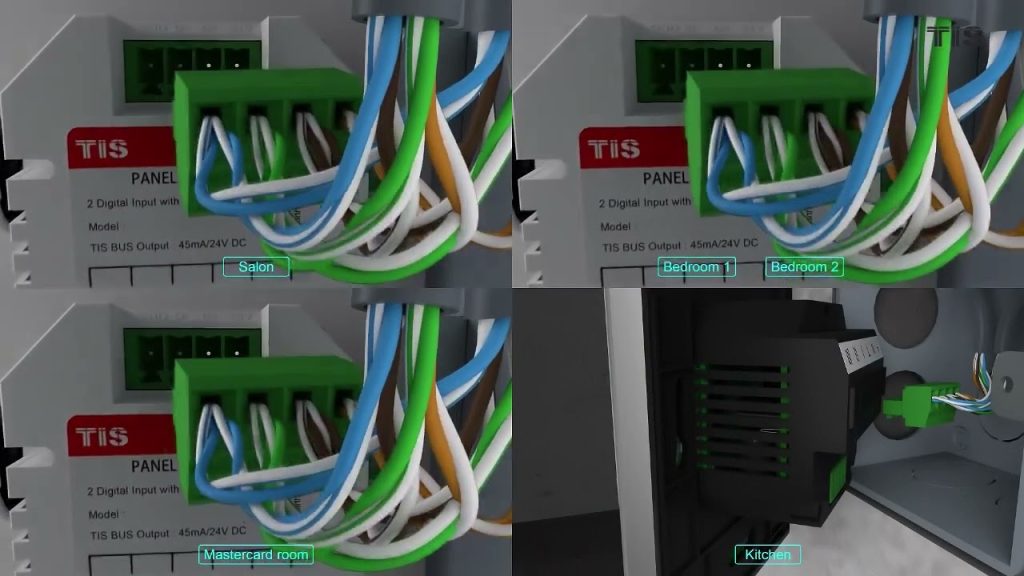
The hands-on wiring stage: pulling neutrals to switch boxes, running Cat6 or similar structured cabling to a central point, and installing any new dedicated circuits for hubs, routers, or automation controllers.
Device Wiring & Connection
Once the wiring is in place, we terminate and connect the actual devices, smart switches, dimmers, wired cameras, or PoE equipment and confirm everything is landed correctly.
Testing & Inspection
We test each circuit and device for proper function, and where the work falls under ESA permit requirements, we coordinate the inspection so you have documentation of compliant work.
Homeowner Walkthrough
We walk you through what was installed and where, and answer questions about pairing devices or expanding the system later.
Signs Your Home Needs Smart Wiring Upgrades Before Your Next Device Purchase
A few patterns tend to show up before homeowners realize the wiring not the device is the issue:
- A new dimmer or smart switch buzzes, flickers, or won’t fully turn off
- Your smart hub or mesh router regularly drops connection to other rooms
- You’ve added multiple Wi-Fi extenders just to reach a camera or thermostat
- Adding a smart device trips a breaker shared with other appliances
- You’re planning cameras, an EV charger, or more automation and want the wiring done once, correctly
If any of that sounds familiar, it’s worth having the wiring looked at before the next device arrives.
Ready to Smart-Wire Your Chatham-Kent Home?
If flickering switches, dead Wi-Fi zones, or a hub that keeps dropping connection are getting in the way of your smart home plans, JCP Electric Ltd. can assess your wiring and give you a clear, written plan before any work starts. We serve Chatham, Wallaceburg, Tilbury, Dresden, Ridgetown, Blenheim, and Sarnia-Lambton.
📞 1-519-331-9127 📧 JCPelectric@outlook.com 🔗 Contact Us for a Free Written Quote
Frequently Asked Questions About Smart Home Wiring in Chatham-Kent
Most smart switches and dimmers need a neutral wire to power their internal electronics. Many homes built before smart switches existed only ran a hot wire and traveler to the switch box, which is why a licensed electrician often needs to pull a neutral before a smart switch will work properly.
Low-voltage network cabling generally isn’t held to the same ESA permit requirement as line-voltage wiring, but it still needs to be installed with proper separation from line-voltage conductors. If your project also involves adding a neutral or a new circuit, that line-voltage portion does require a permit. JCP Electric Ltd. handles pulling and closing out that permit as part of the job.
Parts of it, yes—pairing devices, mounting battery-powered sensors, and plugging in a router are reasonable for most homeowners. Anything that involves opening a switch box, pulling a neutral, or adding a circuit is line-voltage work and legally requires a licensed electrician in Ontario. JCP Electric Ltd. can take on just the line-voltage portion of a project if you’d rather handle the rest yourself.
This is often a wiring and placement issue rather than a device problem: a hub on a crowded circuit, poor Wi-Fi coverage from building materials, or a lack of structured cabling to carry signals where it’s actually needed.
Any line-voltage portion of the work—new circuits, added neutrals, rewired switch boxes—falls under ESA permitting and inspection. Low-voltage cabling on its own typically doesn’t, but a licensed contractor should be clear with you about which parts of your specific project require it.
